
How Mass Driver Notifications Close the Biggest Gap in a Facility’s Emergency Plan
9 min read
Key takeaways
- During a facility emergency, drivers sitting in the yard are often the hardest group to reach. As third-party visitors, they’re not on the alarms, PA, and intercom systems built for your staff, and sending someone out on foot to reach them puts an employee back into the emergency.
- A reliable mass notification system starts with knowing exactly who’s in the yard at any given moment. Without a live roster built from gate check-in data, there’s nowhere to broadcast to.
- Knowing who’s scheduled to arrive matters as much as knowing who’s already on-site. Appointment data lets you hold or warn inbound drivers before they pull into an active emergency.
- The same SMS channel that handles routine yard communications can also carry an emergency broadcast. Facilities already using digital check-in have the infrastructure in place.
- Pre-written templates, two-way confirmation, and post-incident logs are what separate a working emergency system from one that looks good on paper but fails when it’s needed.
Imagine a fire alarm goes off at your facility. Warehouse staff can hear it, see the strobes, and move toward the exits. Your team knows the drill.
But the drivers sitting in trucks scattered across your yard don’t.
They’re in soundproofed cabs, the PA and alarms built for your staff don’t reach them, and they’re not on your employee notification systems in the first place. Under most emergency plans, the only way to reach them is to send someone out on foot, into the same emergency you’re responding to.

Ready to transform your supply chain?
Increase efficiency and productivity. Say goodbye to delays, handwriting errors, and time-intensive manual data entry.
This is the gap most emergency action plans leave open. The facility’s alarm system covers the building. The yard is a different problem entirely.
Mass driver notification (built on the same SMS channel your drivers already used to check in) closes it. This article explains how it works and how to set it up before you need it.
Why Facility Emergencies Are Hard to Communicate in the Yard
Executive summary: The communication systems facilities used for internal emergencies don’t extend to the yard. Drivers in trucks are outside the coverage of PA systems, intercoms, and visual alerts — and at high-volume facilities, they’re spread across a large physical area with no direct channel to the building.
Most facilities have thought through what happens inside the building during an emergency. Fire alarms, overhead PA announcements, exit lighting, and evacuation routes are all part of a standard emergency action plan.
OSHA’s 29 CFR 1910.38 requires employers to maintain a written emergency action plan for their employees, and most facilities do. Those plans are built around staff. The drivers in your yard are third-party visitors, so the alarms, PA, and headcount procedures that protect employees were never designed to reach them.
What those plans often don’t account for is the yard.
Drivers in the Yard Are Outside Your Normal Communication Systems
A facility’s public address system carries sound well inside the building. Outside, that changes quickly. Engine noise, wind, distance, and the insulation in a modern truck cab all work against it. A driver parked 400 feet from the building, engine idling, is unlikely to hear an overhead announcement, even if your PA has outdoor speakers.
That’s not a corner case. It describes the default condition for a significant portion of the people on your property during any given operating hour.
Manual Notification Puts Your Staff in Harm’s Way
If your emergency plan for the yard is “send someone out to tell the drivers,” the plan has a problem. The person you send is now moving through the same area where the emergency is unfolding.
If it involves a fire, a chemical release, severe weather, or an active safety incident, physical notification isn’t just slow; it may not be safe.
In a large yard, one person can’t quickly reach 30-plus trucks. And without a record of who checked in and where they are, there’s no way to confirm you’ve gotten to everyone.
What a Reliable Mass Driver Notification System Requires
Executive summary: Reaching every driver in the yard during an emergency depends on three things being in place beforehand: a live roster of who’s on-site, a channel that reaches drivers without an app, and a list of who’s scheduled to arrive that day. Get those ready in advance, and the emergency message is a single step, not a scramble.

Reaching every driver at once is a capability, not a separate product to buy. It comes from combining data you already collect (who’s on-site, who’s due in) with a channel drivers already use (SMS).
Most facilities that already run digital check-in already have the pieces. The gap is connecting them.
A Live Roster of Every Driver Currently in the Yard
You can’t broadcast to drivers you can’t account for. Mass notification depends on two lists: who’s in the yard right now, and who’s scheduled to arrive today. The first tells you who to reach. The second tells you who to warn or hold before they drive into an active emergency.
That data has to come from your gate check-in process and appointment scheduling. When every arriving driver completes a digital check-in before entering the yard, their phone number is captured, and their on-site status is logged. That roster updates as drivers arrive and depart. In an emergency, it becomes your notification list.
A manual sign-in sheet can’t do this job. It doesn’t update in real time. It doesn’t capture mobile numbers in a usable format. And it doesn’t tell you whether a driver from hours ago is still on-site.
A Channel That Reaches Drivers Without an App or Prior Setup
Most drivers who visit your facility won’t have your app installed. They visit dozens of facilities a month, each with its own platform. Asking them to download something specific to your operation before receiving an emergency alert isn’t realistic.
SMS doesn’t have that problem. Every phone can receive a text message. No download, account creation or pre-registration is required. If a driver used SMS to PreCheck® before arriving, they’ve already established the channel. An emergency broadcast reaches the same number that’s already connected to your workflow.
A List of Who’s Scheduled to Arrive That Day
Knowing who’s already in the yard is only half the picture. You also need to know who’s booked to arrive. If you issue an evacuation, a driver scheduled for an 11 a.m. dock appointment shouldn’t be pulling up to the gate minutes later.
Dock appointment scheduling gives your team that inbound list. Paired with the on-site roster, it lets you reach the drivers already here and hold or warn the ones still on their way.
How Leading Facilities Are Keeping Drivers Informed and Accounted For
Executive summary: Facilities that move to digital check-in and SMS-based driver communication not only gain efficiency in routine operations — they also build the communication infrastructure that emergency notification depends on. Here’s how two facilities got there.
The case for mass driver notification often comes from the same direction as the case for digital check-in: teams that saw the gap started solving for everyday driver communication and ended up with a system that handled more than they expected.
Heartland Bottling
At Heartland Bottling, drivers at Heartland’s Olathe production center had to leave their cabs to check in and collect move assignments. Each trip out of the truck put a person on foot in an active yard — walking between rows of heavy equipment to reach the shipping office and back.
At a busy facility, those trips compound. The foot traffic was the safety exposure.
Heartland Bottling implemented Vector to improve yard safety and driver communication. The goal was to reduce the time drivers spent waiting for assignments and cut the foot traffic that was creating safety exposure in the yard.
The shift to SMS-based driver coordination kept drivers in their cabs throughout the check-in and move process. Business Process Lead, Matt Bromley, described watching a Marten driver complete a full drop-and-hook in about five minutes after the change; the kind of speed that’s only possible when the driver knows exactly what to do without getting out of the truck.
That same channel (drivers already connected via SMS, already logged in the yard’s live roster) is the one that reaches them in an emergency. Heartland built it for daily yard operations. The infrastructure is there.
Sprouts Markets
Coordinating between drivers and the shipping office at Sprouts Markets was mostly done over phone calls. Clerks fielded a steady stream of inbound calls from drivers asking about dock assignments, wait times, and load status. That back-and-forth consumed time on both ends and left drivers with no reliable way to get an update without calling in.
Post implementation, the shift was most evident in how the transportation office communicated with drivers on-site.
Jonathan, of Sprouts Markets, described it this way:
“It’s the ins and outs of our transportation office and the communication with the clerks that has been so much more streamlined via the text messaging application.”
When driver communication runs through a logged SMS thread, the same thread can carry an urgent yard message. Facilities that built driver communication on SMS aren’t starting from scratch when they need to broadcast fast. They already have a list, a channel, and a format in daily use.
How to Build a Yard Emergency Notification System
Executive summary: A working yard emergency notification system comes down to four steps. It starts with the check-in data that gives you an accurate roster, runs through message preparation and two-way confirmation. Most of the work happens before an emergency, not during it.
The goal is to have every step already in place, tested, and practiced before your team needs it. Under pressure, you don’t want to be configuring anything.
1. Build a Real-Time Driver Roster From Gate Check-In
Every driver clears this gatehouse check-in, where the live yard roster and the phone number to text in an emergency are kept. The roster is the foundation. Every driver entering the yard should complete a digital check-in that captures their mobile number and logs their on-site status in your yard management system.
This doesn’t require expensive hardware. A PreCheck® via SMS before arrival, a kiosk at the gate, or a tablet-based check-in all work. The requirement is that the data is current and that mobile numbers are tied to active yard statuses, not just historical visit records.
2. Connect Check-In Data to a Mass Notification Trigger
The roster you’ve built needs to connect to a message-sending function your team can activate quickly. In an emergency, the fewer steps between “trigger the alert” and “message sent,” the better.
Your yard management system should be able to act on the current on-site driver list. If it supports direct SMS messaging, the mass notification trigger can live inside the same tool your team uses daily. If it doesn’t, map out the manual steps now so the process is clear when it counts.
3. Write Emergency Message Templates Before You Need Them
Under pressure, no one writes a good message from scratch. Pre-written templates for your most likely emergency scenarios (fire evacuation, shelter-in-place, hazmat release, severe weather, facility lockdown) mean your team can review and send, not compose.
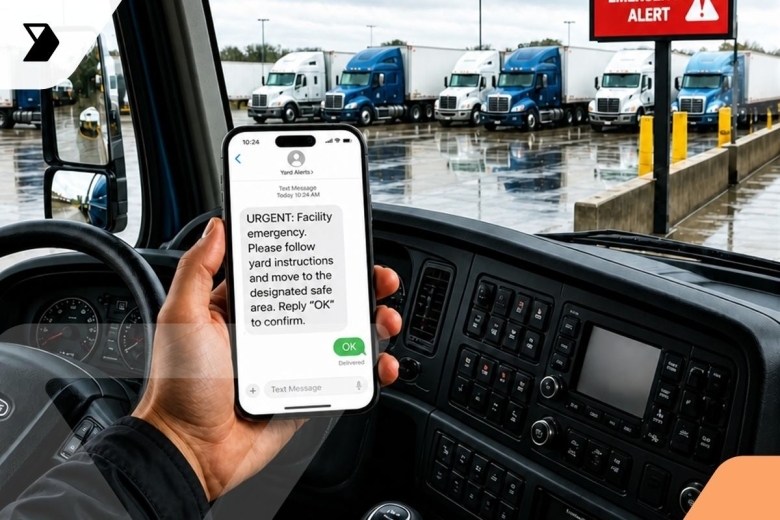
Keep them short. “Facility emergency: evacuate the yard immediately. Move to [exit/staging area]. Do not re-enter until notified.” That’s enough. Long messages get skipped or misread under stress. Keep each template short and write it in plain English. Your team should be able to pick the right scenario and send it with no editing under pressure.
4. Add Two-Way Messaging as a Confirmation Layer
A one-way broadcast reaches everyone at once, and in a live evacuation, that speed matters most. Two-way replies are a useful second layer: drivers can confirm they got the message or flag that they need help, and your team can follow up with anyone who hasn’t acknowledged.
One caveat to plan for: in a full evacuation, your own staff may be away from their screens, so treat two-way confirmation as something you reconcile once people are safe, not as the primary way you reach drivers.
That exchange happens in the cab. It doesn’t require anyone to get out of the truck.
Keep Every Driver in the Yard Connected With Vector
The infrastructure for mass driver notification doesn’t have to be a separate system you stand up for emergencies. When drivers check in via Vector PreCheck®, their mobile number is logged and tied to their active yard status from the moment they finish checking in.
Here’s how Vector’s driver communication and yard management systems give your facility the infrastructure that yard emergency notification depends on:
- Drivers PreCheck® via SMS before arrival, no app required. Their mobile number and active yard status are logged from the moment they finish checking in.
- The real-time yard map shows which drivers are on-site, where they are, and how long they’ve been there. A separate driver roster gives your team the on-site list, so you have both the map view and the list at any point during the shift.
- SMS-based driver messaging supports two-way communication between the shipping office and any driver in the yard.
- Every message sent through the system is logged with timestamps and delivery records, supporting post-incident documentation and compliance review.
- The same channel handles routine yard communications (dock assignments, move instructions, check-in confirmations), so drivers are already engaged with it by the time an emergency message is needed.
See how Vector’s connected facility tools support safer operations from daily check-in through emergency response.
FAQs
What Counts as a Facility Emergency That Requires Driver Notification?
Any event that creates an immediate risk to people on your property requires notifying everyone present, including drivers in the yard. Common examples include fires and fire alarms, chemical or hazmat releases, severe weather events (tornadoes, lightning, flash floods), facility lockdowns, power failures that affect gate or dock safety, and major accidents in the yard.
Your emergency action plan, required under OSHA 29 CFR 1910.38, defines the scenarios for your employees. Reaching third-party drivers in your yard is a separate duty of care, and your notification approach should cover them as well.
What If a Driver Doesn’t Have an App Installed?
SMS doesn’t require an installed app. As long as a driver has a working phone number, they can receive a text message. That’s why SMS is the right channel for a notification system that needs to reach everyone in the yard, not just drivers who happen to use a specific platform. Vector’s PreCheck® process uses SMS as the default, meaning drivers are connected without any downloads.
Can You Warn Drivers Before They Reach an Active Emergency?
Yes, and this is where appointment scheduling matters. If you’ve issued an evacuation, the last thing you want is a booked driver pulling up to the gate. A facility that knows who’s scheduled to arrive that day can hold or reroute inbound drivers and message them before they enter the yard. Pairing your on-site roster with your appointment list closes the gap on both ends: the drivers already here and the ones still on their way.
Published on July 14, 2026
Last updated on July 14, 2026
Subscribe to stay updated on Vector and logistics trends
" " indicates required fields

Continue reading

Ready to transform your supply chain?
Increase efficiency and productivity. Say goodbye to delays, handwriting errors, and time-intensive manual data entry.