
How Autonomous Yard Spotters and AI Yard Automation Work in a Live Yard
12 min read
Key takeaways
- A single site commercial deployment, like the fully autonomous yard truck ISEE announced, does not prove consistent performance across dozens of facilities with different layouts, trailer mixes, and peak volumes.
- An autonomous tractor perceives traffic, plans a route, and couples to a trailer, but it has no view of inbound shipment priorities, dock readiness, or carrier commitments.
- Vector tracks trailer locations continuously from in-cab activity and assigns moves by rule, so a photographed trailer closes the task automatically and dispatchers manage exceptions instead of entering data.
- Because the same orchestration logic works whether or not a driver sits in the tractor, software and process wins pay off before autonomous hardware ever enters the yard.
Before a vendor call earns an hour of your time, you need to know where trailers are, what moves are planned, who owns exceptions, and whether the system will shorten carrier turn times without disrupting shipping.
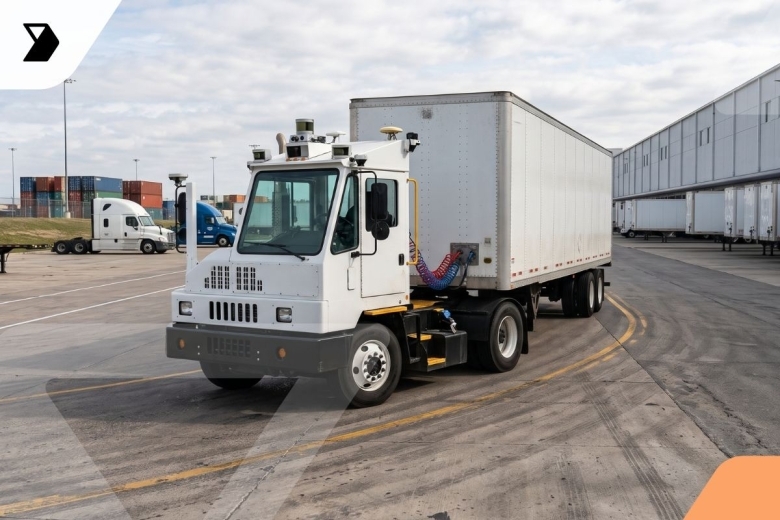
An autonomous yard spotter is a driverless yard truck or tractor. The spotter is the person who normally drives it. The term covers both the equipment and the job. The vehicle handles the physical move.
Deciding which move matters depends on software that reads inbound priorities and dock status. That software also needs a trailer inventory your team can rely on. In documented deployments, existing facility systems request the material move. Then the autonomy system dispatches a vehicle to execute it.

Ready to transform your supply chain?
Increase efficiency and productivity. Say goodbye to delays, handwriting errors, and time-intensive manual data entry.
That split between the truck and the system behind it shapes everything that follows: what works today and what the whole thing costs.
The Real State of AI in Warehouse and Distribution Yards
Executive summary: ISEE’s first fully autonomous yard truck and vision installations prove single-site viability, not consistent results across networks with varying layouts, trailer mixes, and peak volumes.
Commercial deployments exist. Consistent, network-wide performance is a different claim entirely. The distinction matters when you’re evaluating either hardware or software.
Commercial Pilots Are Not Network-wide Scale
According to a BusinessWire press release, ISEE announced what it described as the first fully autonomous yard truck operating in a commercial facility. Computer-vision installations from several providers are also live at operating sites.
What those deployments don’t establish is consistent performance across an entire distribution network. A single-site commercial operation may not reflect what happens across dozens of facilities. Those facilities differ in layout, trailer mix, and peak volumes.
The same question applies to yard management software. A vendor might show strong adoption at one location without yet proving the same results across a customer’s full network.
Every time you hear a proof point, ask whether it covers one site or many. Ask whether performance holds during peak periods. Ask whether it holds during normal operating conditions too.
That discipline protects you. It applies whether you’re evaluating autonomous hardware or a yard management system.
AI, Workflow Automation, and Electrification Are Three Different Investments
AI navigating around a pedestrian and a software rule assigning the next trailer move are not the same investment. AI interprets sensor data and makes split-second driving decisions. Workflow automation executes configured business rules: assign this task, alert that dispatcher, update this record when a spotter photographs a trailer in its new spot.
That photograph triggers the system update, so your team stops entering data manually and shifts to exception management instead.
Electric propulsion is a third category entirely. A yard tractor can be electric without being driverless, and driverless without being electric. Evaluate each on its own operating requirements and economics. Don’t bundle them into a single procurement decision.
Drones follow the same logic. Automated flight is not the same as AI image analysis.
The useful question is what the camera data shows, such as which trailer bays are occupied. That data then informs which scheduling decisions your team can act on.
The achievable wins in most conventional distribution yards today are software and process wins. They do not require autonomous hardware to deliver value.
The Three Layers Behind Autonomous Yard Operations
Executive summary: Computer vision identifies trailers at gates and during moves, but obscured plates and un-updated completed moves break inventory accuracy unless location tracking runs continuously from in-cab activity.
Autonomous yard automation involves three distinct layers. Keeping them distinct helps you evaluate each investment on its own terms.

Computer Vision Identifies Assets and Locations
Gate cameras record trailer identities and arrival times as trucks enter and exit. That sighting tells you a trailer arrived. It does not confirm where the trailer is parked an hour later.
Vehicle-mounted cameras fill part of that gap. They capture trailer numbers and parking locations during yard movements. Those records feed back into inventory. Missed reads may occur with obscured plates or damaged identifiers. Conflicting records may arise when a move completes without a system update.
Test both scenarios before assuming the inventory is accurate.
Platforms like Vector track trailer locations continuously from in-cab activity, keeping trailers consistently monitored without adding expensive RFID infrastructure. That matters when your budget is already committed elsewhere.
Autonomous Tractors Execute the Physical Move
An autonomous yard tractor perceives surrounding traffic, plans a route, and couples to a trailer. It stops when conditions require it. Those are the boundaries of what the vehicle does. It has no view of inbound shipment priorities, dock readiness, or carrier commitments.
That judgment comes from the software layer that coordinates yard activity above the vehicle level.
Coupling, backing, and exception-handling capabilities vary across vendors. Verify each against your actual trailer configurations and equipment condition. Don’t assume a capability demonstrated on a vendor’s fleet will perform the same way in your yard.
Orchestration Turns Business Priorities into Coordinated Moves
Orchestration is the layer that coordinates yard activity. It connects move requests, trailer locations, dock readiness, vehicle assignments, and completion updates into a single sequence. It decides which shipment matters most to the business right now.
The autonomous tractor decides which path to take across the yard. Those are two separate jobs.
This distinction matters most when human-driven and autonomous trucks share the same yard, which applies to most facilities that weren’t purpose-built for autonomous equipment.
Vector’s YMS assigns tasks by rule and tracks trailer status so dispatchers always have current information. It coordinates between dispatchers and warehouse teams by pulling inbound shipment data and dock status from your WMS. That coordination works whether the tractor has a driver in it or not.
How a Trailer Moves Through a Live Automated Yard
Executive summary: Each trailer movement from gate arrival to departure generates auditable events usable for detention disputes, though camera recognition only confirms identity and never authorizes entry.
The sequence below follows one inbound trailer from gate arrival through dock delivery and final departure. Each handoff creates an auditable event. Your team can reference these events for carrier communication, dock scheduling, or detention disputes.
Arrival Creates a Usable Yard Record
Gate cameras capture trailer identity and arrival time the moment a driver pulls up. That record triggers a check against expected arrivals and inbound shipment data before your team issues any parking instruction.
Any gate may see an unreadable identifier, an unexpected trailer, or an early arrival. Each scenario requires a decision before the driver advances. Acting after the fact is what causes dock schedules to slip.
Camera recognition confirms what arrived. It does not authorize entry. Those are two separate steps.
Digital pre-check-in and geofenced ETA tracking can address unannounced arrivals before the truck reaches the gate. Gate automation supports guardless operation, freeing guards to greet and assist drivers rather than manually verifying credentials at the gate. Drivers stay in their vehicles throughout. That keeps foot traffic out of active lanes.
A Move Request Becomes a Dock Delivery
A move request triggers a sequence whose exact steps depend on your installation, but the logic holds across setups. The system confirms the trailer’s identity and recorded location. It checks the destination dock. Then it assigns an eligible vehicle.
The spotter receives the task in-cab via rules-based assignment. Drivers stay connected to the office via SMS, cutting out radio back-and-forth.
Watch: Vector YMS in Action: Spotter Movements & Yard Audits
Shows actual spotter movements and yard audits matching this exact task-assignment workflow.
When the move completes, the spotter photographs the trailer in its new position.
That image acts as the completion trigger, the single action the platform treats as its built-in “definition of done,” meaning the task isn’t considered finished until that trigger fires, at which point trailer inventory updates and the task closes automatically. Dispatchers often find themselves reconciling separate screens after each move.
This approach replaces that step with an automatic status update, so dispatchers spend time on exception management, not manual data entry.
The same orchestration logic works whether the vehicle has a driver. That means the investment pays off before full autonomy arrives.
Departure Closes the Operational Timeline
Departure is where yard records become financially useful. Your team can match a time-stamped departure event against the scheduled pickup window to validate a detention claim before an invoice arrives.
Exact dwell times, move histories, and gate images give you a documented basis for disputing accessorial charges when the carrier’s version of events differs from yours.
Connect those records to your document and invoice workflows. Disputes may arise when shipper and carrier records conflict, and a departure record with a clear timestamp gives your team something concrete to point to.
Vector’s eBOL creates a verifiable digital record, geo-stamped, time-stamped, and part of a complete digital audit trail for the transaction, that cuts the time spent resolving those conflicts.
Watch: Vector: How eBOL Delivers Supply Chain Efficiency 🚀
Demonstrates the eBOL digital record and audit trail claim made in this exact sentence.
That record feeds the billing packet. It does not replace the full documentation your finance team needs to authorize payment. When your team uses it correctly, the eBOL can compress invoice cycles that often run weeks down to hours.
The Physical Handoffs and Exceptions That Still Shape Performance
Executive summary: Swing-door opening does not disappear with autonomous tractors, so assign a door crew or dock staff explicitly before each move rather than discovering the gap on arrival.
Autonomous yard hardware handles the physical move. Physical handoffs and exception scenarios still require deliberate planning.
Each scenario needs an assigned owner and a documented recovery step. Your orchestration layer should flag the exception to the dispatcher before it delays your dock schedule.
Trailer Doors Remain a Workflow Decision, Not a Solved Problem
Swing-door trailers require someone to open those doors before a trailer reaches the dock. That task doesn’t disappear with autonomous equipment. It shifts to someone else on your team.
Some facilities staff a door crew that works ahead of each move; others rely on dock personnel to handle doors on arrival. Either approach works, but assign it explicitly before the move begins. Otherwise, the gap only surfaces when the tractor arrives.
Drive-through dock designs relocate door opening inside the building, keeping that work out of the yard. The task itself remains, so it still needs an assigned owner before the move starts.
Verify your actual trailer and dock mix before committing to any configuration. Automation shifts this handoff. Orchestration makes it visible and easy to plan for.
Robotic Connections: What’s Real and What to Verify
Robotic brake and electrical-line connections have moved past the concept stage. Outrider announced its TrailerConnect technology as commercially available, designed to handle brake and electrical-line connections without a person on the ground. That capability is distinct from trailer-door handling, which remains a separate physical task.
An announced capability isn’t the same as proven reliability across your fleet. Yards often include trailers of varying ages and conditions. That mix can look very different from a vendor’s demo setup. Test robotic coupling against your actual trailer mix before committing.
Your orchestration layer also needs a defined response when a connection fails. Ask vendors specifically how the system triggers an exception alert. Then ask how the system routes the move to a human when the robotic arm can’t complete the coupling.
Driverless Operation Still Needs a Recovery Plan
Driverless means no onboard safety driver. It does not mean no human support required.
Your team should plan for stopped vehicles, blocked paths, pedestrian encounters, and equipment faults before the first autonomous shift runs. Outrider’s documented safety system includes redundant hazard detection, health monitoring, and emergency stops. Remote support is available when exceptions occur. None of that promises incident-free operation.
You’ll want to name who can intervene and who authorizes recovery. Define separately who clears the fault and returns equipment to service. Automation cuts the physical movement your staff makes across the yard. But it doesn’t remove the need for a clear escalation chain. A yard management or orchestration platform logs each escalation and keeps a full audit trail.
Integrating Automation Without Interrupting Daily Shipping
Executive summary: YMS owns trailer location and moves, WMS owns dock readiness and priority, and TMS owns carrier commitments, so document the authoritative record before connecting anything.
Getting automation to run alongside existing shipping operations is less about the technology and more about how your yard management system, warehouse management system, and transportation management system share and hand off data.
Before any vehicle moves a trailer, your team needs documented answers about who owns each piece of the operational picture, trailer location, dock readiness, and shipment priority.
Existing Systems Need Clear, Documented Responsibilities
Your three core systems each own a distinct domain:
- The yard management system (YMS) tracks trailer location and assigns physical moves
- The warehouse management system (WMS) owns dock readiness and shipment priority
- The transportation management system (TMS) manages carrier commitments and departure status.
Document which system holds the authoritative record for each data point before you connect anything. A move request should specify trailer identity, confirmed location, destination dock, and requestor. Its completion update should confirm the new location and timestamp.
Decide in advance how your team handles duplicates. Do the same for stale locations and failed updates.
Synchronizing these systems is a shared operating agreement between teams, well beyond the technical handshake.
A yard platform that connects to your existing WMS, TMS, and ERP systems via EDI or email-based no-code methods can extend visibility to carriers and suppliers without a rip-and-replace. That means gate, yard, and dock status reaches the partners who need it, not just your internal teams.
Site Readiness and a Staged Rollout Come First
Before autonomous equipment enters your yard, your team needs to map and confirm the physical environment. Sites often require clearly defined drive paths and consistent pavement conditions.
Parking geometry must also match the vehicle’s turning radius. Verify network coverage across the full operating area. Charging capacity is a separate planning item if electric equipment is involved.
Start with a bounded workflow. Pick one repetitive move type, keep a staffed fallback, and expand only after agreed service and safety benchmarks are met. You have to design for minimal disruption deliberately; it rarely happens on its own.
Some orchestration platforms follow this staged approach, with software workflows active before any autonomous hardware enters the yard. Vector states its co-pilot approach can have pilot sites operational within weeks, with minimal change management required.
The Metrics and Costs That Determine ROI
Executive summary: Keep carrier service metrics like gate-to-gate turn time and paid detention separate from facility flow metrics such as arrival-to-dock time and exception frequency.
Before evaluating any vendor claim, measure the metrics that move your numbers. The subsections below cover which metrics to track. They also show how to build a cost comparison that reflects your operation, not a vendor’s assumptions.
Carrier Service and Facility Flow Need Separate Scorecards
Start with two scorecards, not one. Carrier service metrics and facility flow metrics answer different questions, and you shouldn’t average them together.
For carrier service, baseline gate-to-gate turn time, appointment adherence, and detention invoiced and paid. Distinguish live-driver waiting from dropped-trailer dwell. That distinction determines how much detention you owe and shapes how carriers view your facility over time.
For facility flow, baseline arrival-to-dock time, move-request-to-completion time, trailers processed per shift, exception frequency, and human interventions per shift. Add documentation completeness as a separate line item. Missing or late documentation often results in invoice deductions that only surface weeks after the load moves.
Compare metrics across similar shifts and volumes, including peak periods. A turn-time average that excludes peak days may not reflect the experience carriers remember. Treat improved OTIF performance and fewer status calls as outcomes to measure against a baseline, not automatic consequences of purchasing a system.
Total Cost Extends Well Beyond the Truck or Camera
Request an itemized quote before you compare any two automation options. The line items matter: equipment purchase or subscription fees, integration work, installation labor, civil works, connectivity infrastructure, charging capacity, ongoing support, training, retained human tasks, and recovery arrangements.
Build your ROI calculation from your own operation. Start with verified annual operating savings. Subtract recurring costs. Compare that net figure against upfront investment. Treat vendor ROI projections as a starting point for questions, not a transferable guarantee.
Watch for double-counting: labor savings modeled against roles you plan to retain do not belong in the savings column.
Software-and-process automation deserves its own evaluation on this basis. Continuous trailer tracking at no additional infrastructure cost carries a measurable savings figure. Guard cost reduction through automated check-in carries another. Faster invoice resolution adds a third. Each is worth calculating before hardware enters the conversation.
Software-and-process automation typically requires lower upfront capital than autonomous hardware, though your actual savings and costs depend on your specific operation. Weigh it on its own merits first.
Put Autonomous Spotting to Work in Your Yard with Vector
Autonomous spotters only move trailers correctly when the yard around them is digital: every trailer location known, every task sequenced by rule, every gate event captured without a clipboard.
That is the layer Vector supplies, turning a yard full of guesswork and radio chatter into a system of record that both human and automated spotting equipment can act on:
- Rules-Based Task Assignment: Vector’s YMS pushes automated spotter and yard staff tasks to tablets and mobile devices in the cab, so moves are sequenced by rule rather than by radio call.
- Hardware-Free Trailer Tracking: Real-time trailer visibility runs without RFID tags or costly yard hardware, keeping an accurate live map of what sits where.
- Photo-Triggered Definition of Done: When a spotter photographs a trailer in its new location and uploads it, that image triggers the system update, eliminating manual data entry and duplicate documentation.
- FastPass® Gate Automation: Vector FastPass® handles pre-check-in via SMS, app, or kiosk and integrates with gate hardware and cameras to support unmanned gates and autonomous yards.
- WMS-Connected Dock Coordination: Yard truck activity flows into WMS systems while the YMS receives inbound shipment data and dock status, driving automated dock assignments and visibility into parking status.
Explore Vector to see what a connected yard looks like when trailer data, the gate, and the spotter workflow run on the same system.
Published on November 23, 2026
Last updated on November 23, 2026
Subscribe to stay updated on Vector and logistics trends
" " indicates required fields

Continue reading

Ready to transform your supply chain?
Increase efficiency and productivity. Say goodbye to delays, handwriting errors, and time-intensive manual data entry.